# Unit 2 Lesson 5 and 8
**URL:** https://forum.code.org/t/unit-2-lesson-5-and-8/36965
**Category:** Coding and Debugging Help
**Created:** [September 26, 2022, 9:00pm UTC](https://forum.code.org/t/unit-2-lesson-5-and-8/36965 "2022-09-26T21:00:38Z")
**Posts on this page:** 6
**Page:** 1
### Author:  [@jnail](https://forum.code.org/u/jnail)
#### Post date: [September 26, 2022, 9:00pm UTC](https://forum.code.org/t/unit-2-lesson-5-and-8/36965/1 "2022-09-26T21:00:38Z")
I’m confused about when and why you have to put and extra input.nextLine() in with some scanners.
This comes up first in lesson 5 where you’re prompt appears before you can type in the response.
When I tried this in lesson 8 for choice a my variables isn’t being stored.
Can someone explain why this happens and how we know when we need to put in the extra . nextLine.
Sorry if this makes no sense.
---
### Author:  [@sylvia.wood](https://forum.code.org/u/sylvia.wood)
#### Post date: [September 28, 2022, 12:57am UTC](https://forum.code.org/t/unit-2-lesson-5-and-8/36965/2 "2022-09-28T00:57:19Z")
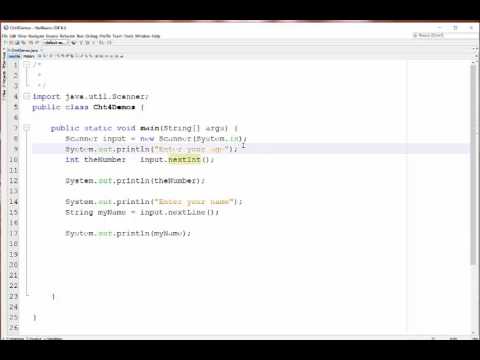
@jnail - Jennifer thanks for your post. Your question makes perfect sense. The nextLine() issue can be a bit confusing. This is particularly evident when you enter an integer and then try to enter a String. The system hangs onto the press on the “enter” key and assigns that value to the nextLine(). Since nextLine() already has a value, it ignores any other input. This YouTube video has a good explanation. Please let us know if you have any further questions.
[ ](https://www.youtube.com/watch?v=_xqzmDyLWvs)
---
### Author:  [@jnail](https://forum.code.org/u/jnail)
#### Post date: [September 28, 2022, 2:59pm UTC](https://forum.code.org/t/unit-2-lesson-5-and-8/36965/3 "2022-09-28T14:59:45Z")
Thank you that video helped a lot!!
---
### Author:  [@rsatija](https://forum.code.org/u/rsatija)
#### Post date: [September 29, 2022, 1:16am UTC](https://forum.code.org/t/unit-2-lesson-5-and-8/36965/4 "2022-09-29T01:16:16Z")
Unit 2 lesson 6 slides bit confusion about tractor.Java but truck constructor. Around slide 140, 152 , and 147. Can someone check that for me. I m new at CSA.
---
### Author:  [@lindsay.davis](https://forum.code.org/u/lindsay.davis)
#### Post date: [September 29, 2022, 1:53am UTC](https://forum.code.org/t/unit-2-lesson-5-and-8/36965/5 "2022-09-29T01:53:02Z")
Hi Rupali,
I just did this lesson today in my class, and I came across the same issue in the slides. The portion of the unit 2 guide for lesson 6 also has the same typos. The class on the right side of the slide-- the one that is not the Car class, should have matching file names, class header names and constructor. I found a mix of Tractor, Truck, and Car- is this what you are confused about? I corrected these typos on my copy of the slides, here are [my versions of slides 140-142](https://docs.google.com/presentation/d/1AAjryOrz-bU0sij4f_QAeCxL7km7Ppipe_xv-NUHgkQ/edit?usp=sharing) which I believe to be correct. I emailed [support@code.org](mailto:support@code.org) to let them know about the issue.
Does this answer your question? please reach out if you have more questions 🙂
-Lindsay
---
### Author:  [@rsatija](https://forum.code.org/u/rsatija)
#### Post date: [September 29, 2022, 5:25am UTC](https://forum.code.org/t/unit-2-lesson-5-and-8/36965/6 "2022-09-29T05:25:05Z")
Thanks Lindsay for your response.
This reassurance helps.
Thanks,
Rupali.