Two things I need help with:
- I want the enemy bullets to keep traveling to the left after the enemy planes appear. Right now, they stay a consistent distance ahead of the enemy plane because I couldn’t figure out the code to keep it traveling left and aligned vertically and horizontally with the plane.
- When the player hits the enemy planes, some of the enemy bullets reset without the enemy plane and they don’t travel left. After a while, it seems like the enemy planes don’t reset to the right either.
Link to the project or level: WWI Fighter Game
What I expect to happen: Enemy planes fly left with enemy bullets preceding them. When they get to the left or are hit by a player’s bullet, they reset to the right.
What actually happens: Some of the enemy bullets appear by themselves without the plane after being hit; enemy planes don’t always reset. Enemy bullets don’t keep traveling left ahead of the plane.
What I’ve tried: I tried just setting the enemy bullet velocityX with the x position being a little ahead of the plane, but because it’s random, I can’t think of a way to set the x position without perpetually making it a certain distance in front of the enemy plane. I’ve also turned on debug to try to figure out which bullets weren’t resetting their position correctly.
The issue you are having with the bullets is that you are constantly resetting them every draw cycle. You need a way to determine whether the bullet has been fired or not. If the bullet has been fired, then do not try to reset its x until it hits the left edge of the screen or the player. To do this you can create a boolean variable to keep track of each bullet as to whether it has been fired.
For example
I also noticed that you were using an OR (||) instead of an AND (&&) for the conditional. If you are wanting the enemy’s x position to be in the range of 15 and 350 it needs to be an and statement.
You will also need a way to reset the variables when the bullet gets to the left of the screen. So you could make function like this and call it every draw cycle.
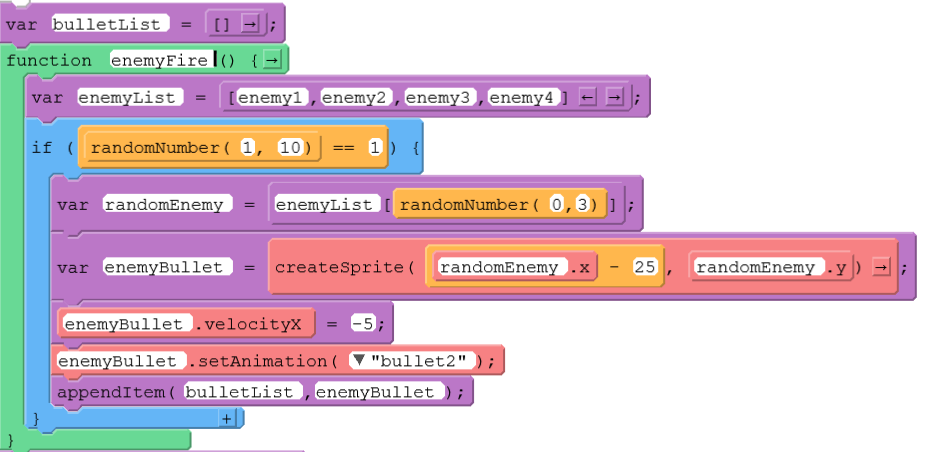
I don’t actually recommend the solution above, but it should work in getting the enemy bullets to fire forward. In reality, the bullets and coins should be created dynamically. For example
Here the bullets are getting created by randomly choosing one of the 4 enemies to spawn from. It then adds it to a bulletList. This bulletList could be looped through every draw cycle to see if the player is touching one of the bullets or to remove the bullet from the game when it reaches the left side of the screen. Here is how you could remove them from the screen when bullet reaches the left edge.
Thanks for your reply. Do you have the code in Game Lab? I tried adding the pieces of code you had in the pictures to my game, but it’s getting errors.
Jenny
Edit: Ok, figured out I needed to list the enemyBullets in the bulletList (my line 425)
However, now the enemies are firing multiple bullets and then the enemies don’t seem to reset but the bullets keep firing. Also, the enemy bullets don’t seem to effect the player anymore.
The enemies don’t reset because their x velocity is being set to 0 inside of hitEnemies(). I didn’t realize you only want the enemies to shoot only once. Are you wanting them to shoot once again when they spawn back in on the right?
If you modified the code to create bullets dynamically, then you shouldn’t be prepopulating the enemy bullet list with the 4 bullets. You should only add them to the list when they are created and they should be removed from the list when they are destroyed. To check for player hit detection with the bullets, you can loop through the list of bullets and check each individually.
I can send you an updated version of the code later tonight
1 Like
I updated the code. Here is the link Game Lab - Code.org
Each enemy only shoots once each time it spawns. I made it so that the explosions are created dynamically on top of where the enemy was and they are automatically destroyed by setting the lifetime property of the explosion once the animation is done. It looked like you were trying to make the enemies have a health system where they would take three hits before being destroyed. If this is the case you can update the line
enemy.health = 1;
Inside of the respawnEnemy(enemy) function. The purpose of that function is to respawn the enemy on the right side of the screen and reset their properties on health and that they can shoot again.
I also simplified the logic for the coins spawning in. You were originally checking with if statements to see if a coin was touching another coin. The problem using an if statement is that they could theoretically get random number again that is touching another coin. So you would need to repeat until they are not touching.
I also fixed the issue if the player kept pressing the spacebar, the bullet would restart right next the player’s plane. Now when they press the spacebar it waits until the bullet hits a plane or the right edge of the screen before making a new bullet.
Let me know if you have any questions on the code or if there are any other problems with it.