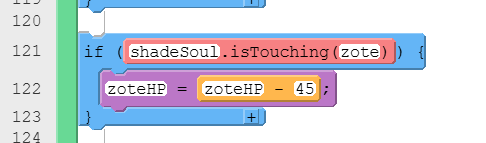
However, it is only working when the knight is touching zote. He wants it to work even if zote is not touching the knight.
In order to get shadeSoul to appear, zote needs to touch the knight. Press the x key three times to power up, and then press the a key for shadeSoul to go across.
There’s a lot going on here! It was a little tricky for me to keep track of which sprite was which to try and debug, but I did notice one thing that very well could be the issue.
The sprite shadeSoul is created three separate times … lines 36, 215 and 229. Although some of these may be functions and may not be called every time, it is best practice to only create a variable (sprite) one time … usually at the beginning of the code… and then update the values in other parts of the code. If you have two different instances of the sprite present in the memory at once, it’s very unpredictable what may happen and this is a common result … collisions are ignored.
Maybe suggest they update the code so the variable is only declared a single time and go from there, but we’re happy to take another look if they try that and it still isn’t working.